
by Katie Sherbondy
Share
by Katie Sherbondy
Share
- What Is Moventus? Collaborative Work Management That Grows with You
- by Dalia Vazquez
- Share
- The idea is simple: start with the work management you need today knowing you can grow without switching platforms later. Collaborative Work Management Should Make Work Easier to Manage.
- How Does Moventus Organize Work?
- See the Same Work the Way You Need To
- Start With What Needs Your Attention
- Keep Important Updates from Getting Lost
- Notifications are available in-app and via email.
- Keep the Conversation with the Work
- Teams also need the updates, decisions, questions, and context behind the work—without digging through an old chat thread to find them. Moventus keeps that information connected to the Work Item. Comments provide a place to document conversations and decisions, while the Link field connects relevant documents and online resources. The result is a clearer record of both the work and the information behind it.
- Make Ownership and Priorities Easier to See
- Look Beyond a Single Workspace
- Add Governance Without Weighing Everyone Down
- Exact capabilities depend on permissions.
- Together, these controls help organizations give people the access they need without giving everyone the same level of control. What Happens When Your Work Management Needs Grow?
- Start with the capabilities that fit your needs today. When those needs change, you can add more sophistication without starting over. That’s work management that grows with you.
- Who Is Moventus For?
- Work Management That Grows with You
- Get Notified of Moventus Updates.
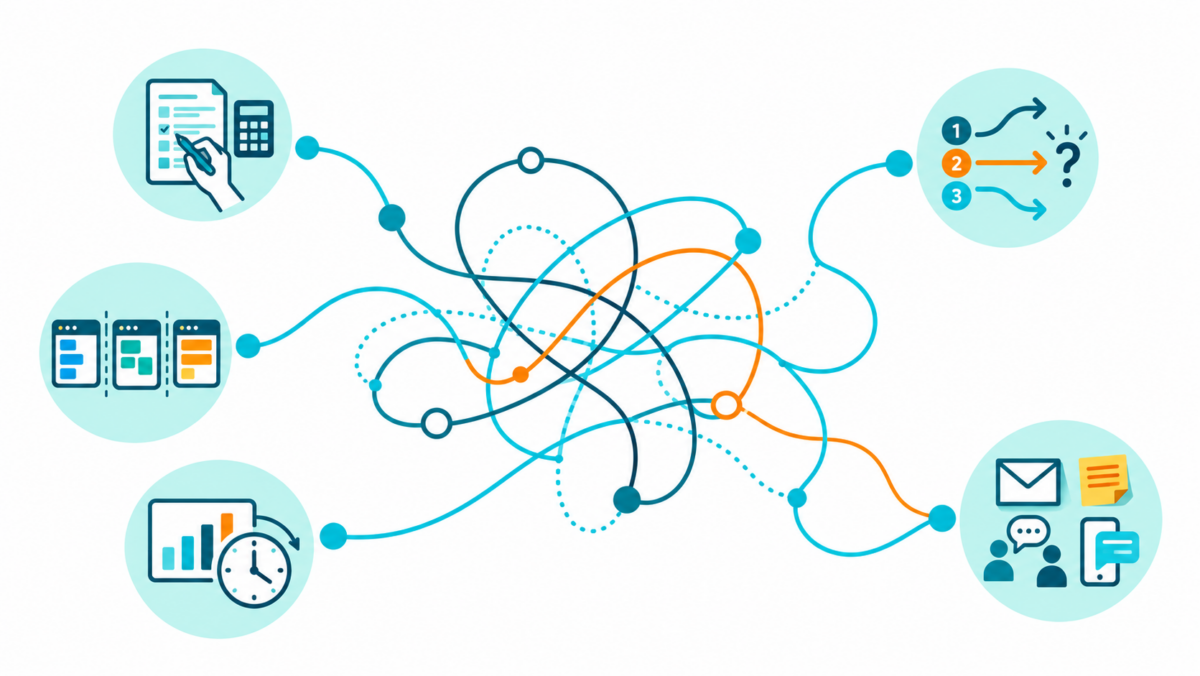
Work has a habit of spreading out. Sticky notes. Texts. Emails—or in that conversation someone swears they will remember later.
When work is spread across multiple tools and informal conversations, priorities blur, context gets lost, and important details. This is something we call the “messy middle”.
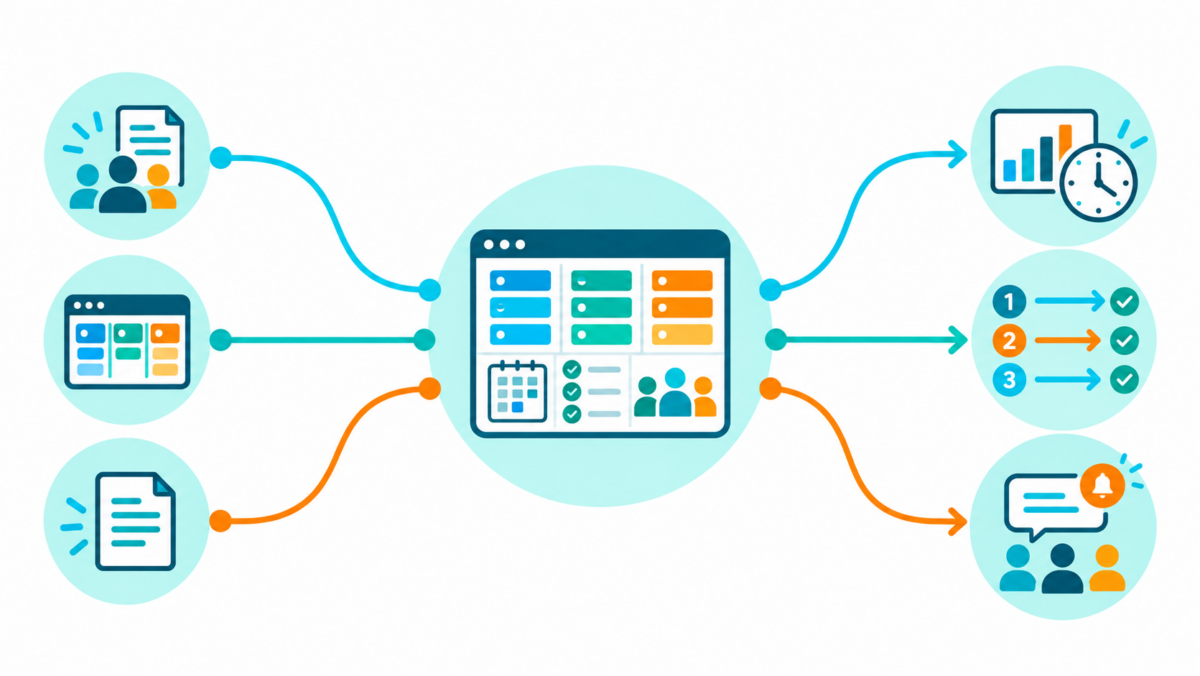
Moventus brings that work together.
Moventus is a work management platform that helps teams organize work under a central application, collaborate, track progress, and see what needs attention. With Moventus Work, teams can manage everyday collaborative work in shared Workspaces, assign ownership, track deadlines and status, and choose the View that works best for the task.
And when your organization needs more advanced project and portfolio management capabilities, Moventus Pro gives you room to grow.
The idea is simple: start with the work management you need today knowing you can grow without switching platforms later. Collaborative Work Management Should Make Work Easier to Manage.
Getting work done is rarely the problem. Keeping everyone coordinated is where things get messy. Most everyone has good intentions and a desire to be productive and deliver quality work, regardless of their role or industry. Multiple work management tools, unclear priorities, and lack of centralized collaboration often leave team members wondering if they are going the right direction.
 Team members need to know what they own, when it’s due, and what needs attention next. Managers need enough visibility to understand progress without chasing updates. And as more people get involved, organizations need a sensible way to manage access and responsibilities.
Enter collaborative work management, or CWM. Moventus brings work, ownership, status, deadlines, and supporting context into a shared system. Teams get a practical way to manage day-to-day work, while managers and Admins have tools to support oversight and governance as participation expands.
In other words: enough structure to keep work moving, without making everyday work feel unnecessarily complicated.
How Does Moventus Organize Work?
Moventus Work starts with Workspaces.
A Workspace is the main place to organize related work and collaboration. You might create one for a department, project, initiative, client, product, or repeatable process.
Inside a Workspace, Modules organize work by purpose:
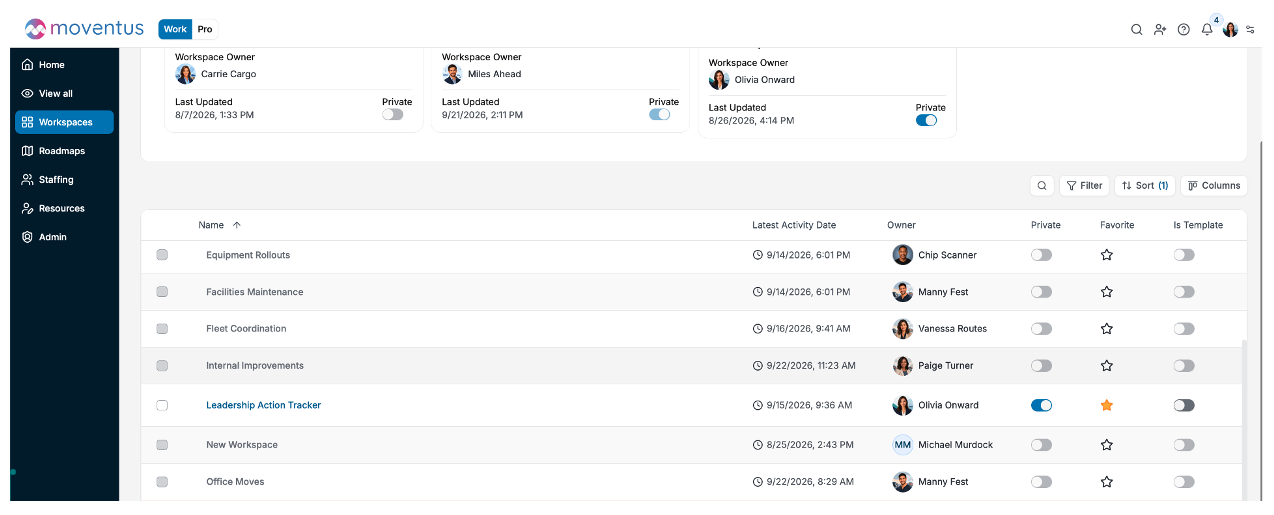
Each Task, Risk, or Request is a Work Item.
Work Items keep useful details with the work itself, including fields such as Assignee, Status, Priority, Category, Start Date, Due Date, Link, and Comments.
That gives teams a straightforward way to answer the questions that come up every day like:
What needs to happen? Who owns it? When is it due? Where does it stand? What do we need to know to move it forward?
And within the Work Item you can @ mention colleagues so that all communication and work can be kept within that Work Item. No more tracking down a floating sticky note or searching for a Teams message sent three weeks ago.
See the Same Work the Way You Need To
Sometimes you need the details. Sometimes you need the big picture. Sometimes you just need to know what’s due Friday.
Moventus Work lets you view the same Work Items in three ways:
Table View organizes work in rows and columns, making it easy to compare fields, edit information, sort and filter items, and choose which details appear
Board View organizes Work Items into columns by Status, so teams can quickly see the progress on a Work Item. And drag and drop capability lets you easily move work through each stage
Calendar View places Work Items on a calendar, helping teams plan around Start Dates, Due Dates, and other time-sensitive work. Calendar includes day, week, and month views.
The important part? You aren’t creating three separate versions of your work. Change the View, and you’re simply looking at the same information in a different way.
Start With What Needs Your Attention
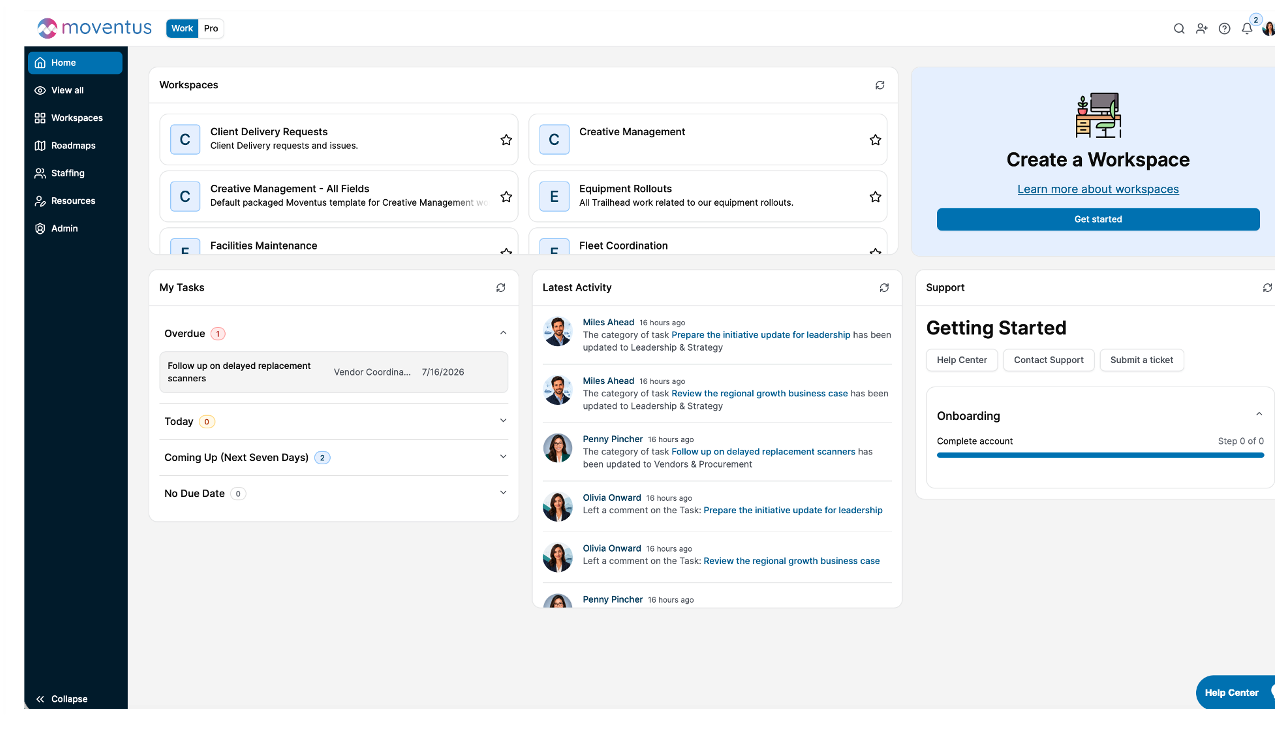
You shouldn’t have to search every Workspace just to figure out where to begin. The Home screen brings assigned work into one place, grouping time-sensitive Tasks into clear categories:
That makes the Home screen a useful starting point for the day. Instead of reviewing work one Workspace at a time, people can easily see the Work Items that need attention and quickly get to work on them. The result is less time spent deciding what to work on and more time moving work forward.
And Moventus offers a mobile app that provides the same connection when people are away from their desks. Users can review and update their work, access Workspaces, create work items, and collaborate through Comments and @mentions.
Keep Important Updates from Getting Lost
Knowing what you own is only part of staying on top of work. You also need to know when something changes. Moventus Notifications alert users to supported activity that may need attention, including:
Notifications are available in-app and via email.
Notifications take the user directly to the relevant Workspace, Work Item, comment, or other applicable location. Users can select to receive notifications in-app, via email, or both.
Latest Activity offers a broader view. Available on the Home screen, it provides a chronological feed of recent activity involving users, their Workspaces, and their assigned Work Items. Together, these features answer two different questions: What needs my attention now? What has changed since I last checked?
Keep the Conversation with the Work
A Work Item’s name and due date only tell part of the story.
Teams also need the updates, decisions, questions, and context behind the work—without digging through an old chat thread to find them. Moventus keeps that information connected to the Work Item. Comments provide a place to document conversations and decisions, while the Link field connects relevant documents and online resources. The result is a clearer record of both the work and the information behind it.
Make Ownership and Priorities Easier to See
Adding more tasks doesn’t automatically make a team more coordinated.
The useful part is knowing who owns the work, what matters most, where things stand, and when action is needed. Moventus Work Items can include information such as:
Together, these fields provide a clear picture of the work. Assignee establishes ownership, Status shows progress, Priority signals importance or urgency, Category helps organize related items, and dates keep work on schedule. Immediately, teams can answer a critical question: Who needs to do what next? Managers also gain a clearer view of progress without relying on scattered status updates.
Look Beyond a Single Workspace
Team members often spend their time managing individual pieces of work, while Managers may need a broader view.
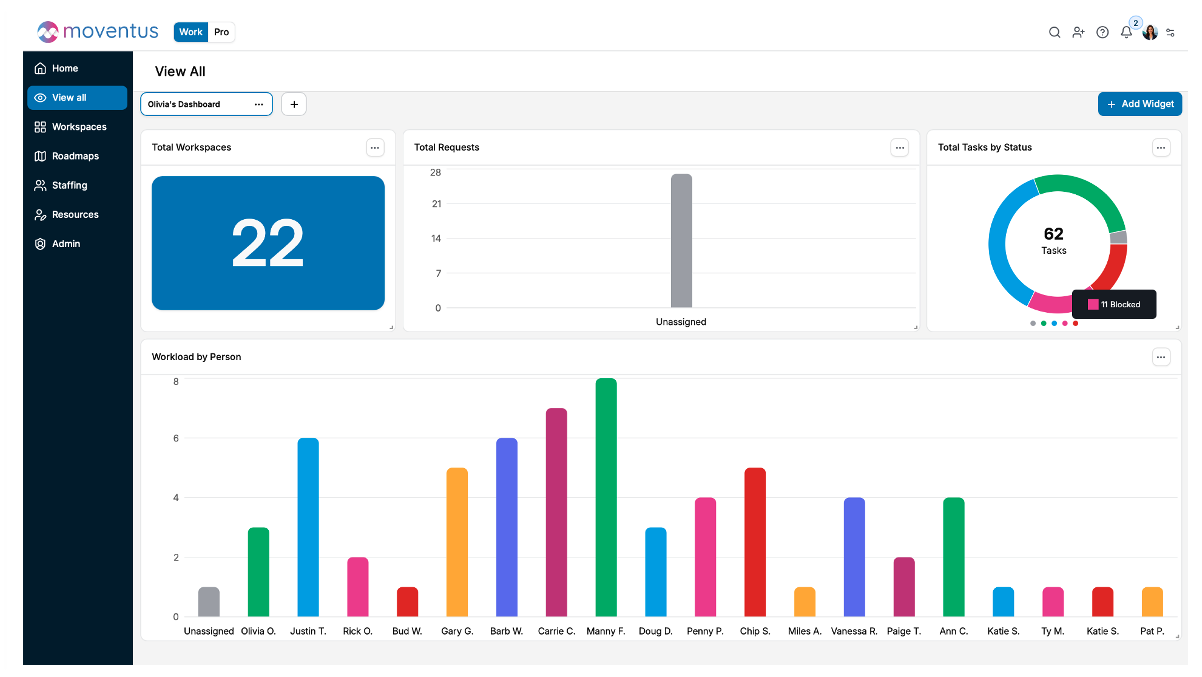
The View All area of Moventus brings together information from work a user can access. Dashboards use Widgets to present information that can help users review workload, progress, trends, and other reporting information. And the great thing is, it’s easy to drill down into the reporting widgets and quickly make changes.
Add Governance Without Weighing Everyone Down
As more people start using a work management platform, access matters.
Some people need to review work. Others need to actively manage it. A smaller group may be responsible for administering the broader environment.
Moventus Work uses four standard Groups to match access with responsibility:
Exact capabilities depend on permissions.
Admins have access to supported instance-level controls for areas such as people, Groups, Workspaces, Fields, invitations, billing information, security assistance, and the Audit Log. Workspace ownership adds another level of responsibility for individual Workspaces.
Together, these controls help organizations give people the access they need without giving everyone the same level of control. What Happens When Your Work Management Needs Grow?
Not every team needs full PPM—but every organization needs a path to it.
Most teams don’t need advanced project and portfolio management on day one. Starting with more complexity can make a system frustrating and harder to adopt.
But a tool built only for simple task management can create its own problem. As work becomes more connected, organizations may need stronger planning, governance, financial tracking, and portfolio-level oversight. With limited functionality in their collaborative work management solution, an organization may find themselves searching for a stronger solution sooner than they anticipated.
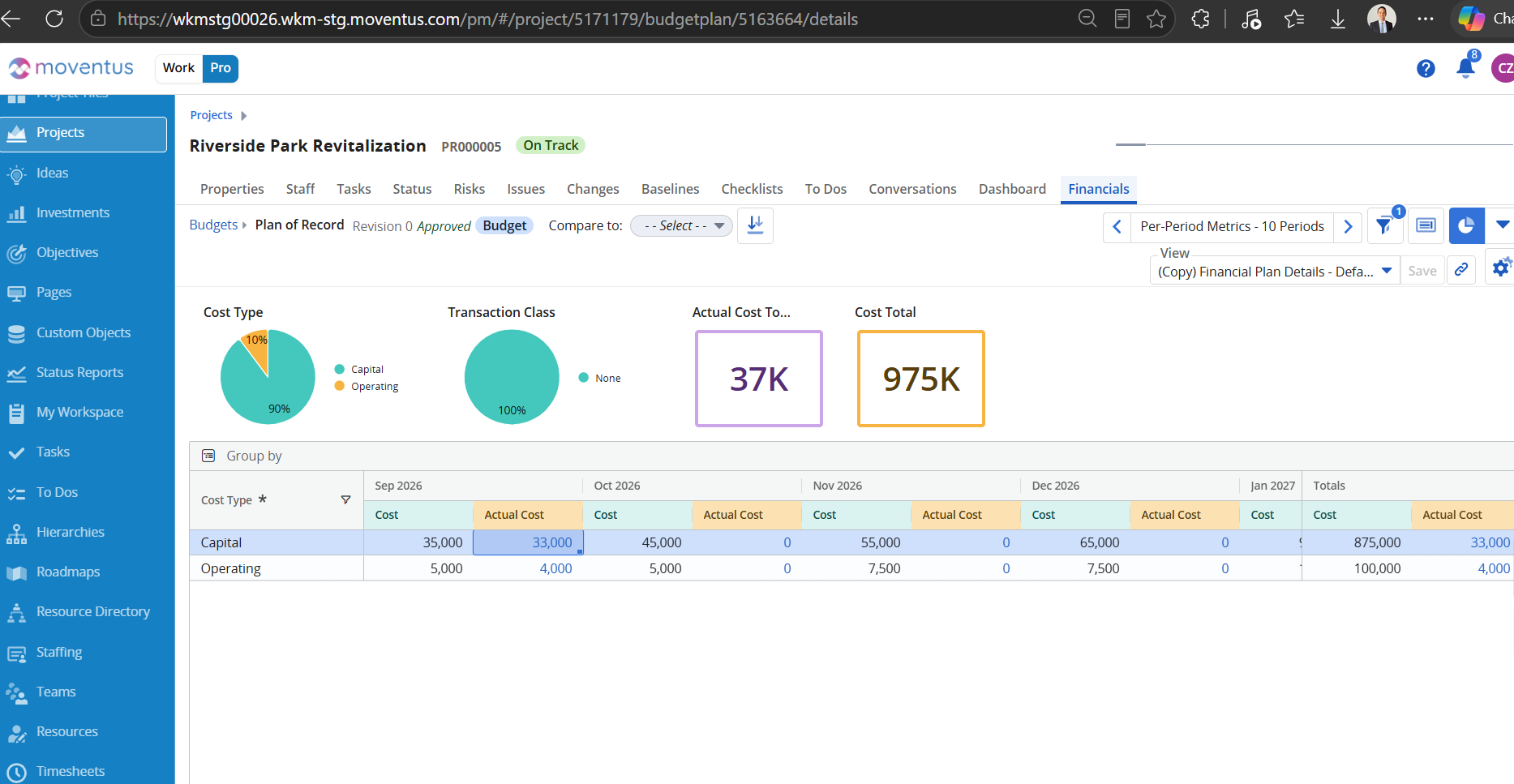
This is where Moventus Pro comes into play. Moventus Pro builds on Moventus Work to give organizations a natural path from everyday collaborative work management into more advanced project and portfolio management as their needs mature. Teams start with Moventus Work to organize, manage, and collaborate on day-to-day work, then add Pro capabilities such as project financials, dependencies, Gantt views, portfolios, advanced resource management, governance controls, and advanced reporting when they need greater structure and oversight. Instead of outgrowing their work management solution and starting another search for a more advanced project management tool, organizations can expand within Moventus—keeping the platform their teams already know while adding the capabilities their growing project environment demands.
Moventus is designed around that progression.
Moventus Work provides the foundation for collaborative work management, helping teams organize work, coordinate responsibilities, collaborate, report, and manage access.
Moventus Pro builds on that foundation for organizations moving toward more advanced work and project management, financial tracking, governance, and project and portfolio management needs
Start with the capabilities that fit your needs today. When those needs change, you can add more sophistication without starting over. That’s work management that grows with you.
Who Is Moventus For?
Moventus isn’t built around one specific company size or one type of team. It supports the way organizations manage work today, with room for those needs to evolve.
Moventus may be a fit if your organization wants to:
Work Management That Grows with You
Collaborative Work Management software should make work easier, not give your team another system to manage. Moventus gives teams a practical foundation for organizing work, collaborating, tracking progress, and focusing attention where it matters. Moventus supports both the day-to-day and the bigger picture.
And as your needs grow, it provides a path toward more advanced work, project, and portfolio management.
Start with what your team needs today. Build from there.
Explore Moventus and see how it can support the way your organization works now and where you want to go next.
STAY IN THE LOOP
